2026-02-26
Building Spider: A Peer-to-Peer Screen Mirroring System from Scratch
The Problem
I wanted iPhone Mirroring, but for Android. Apple's native solution is elegant — your phone appears on your Mac as a window, notifications flow through, clipboard syncs, and you can interact with everything using your trackpad. But if you're on Android, nothing like this exists. Existing tools like Scrcpy require ADB and a USB cable. Vysor needs Chrome. Samsung DeX only works with Samsung devices.
I wanted something that just works — launch the app on both devices, and they find each other automatically over the local network. No cables, no cloud relay servers, no accounts.
So I built Krishnaraj's Spider.
What Spider Does
Spider mirrors your Android phone to your Mac with full remote control. It's peer-to-peer — both devices talk directly over your local WiFi network. No data ever leaves your network.
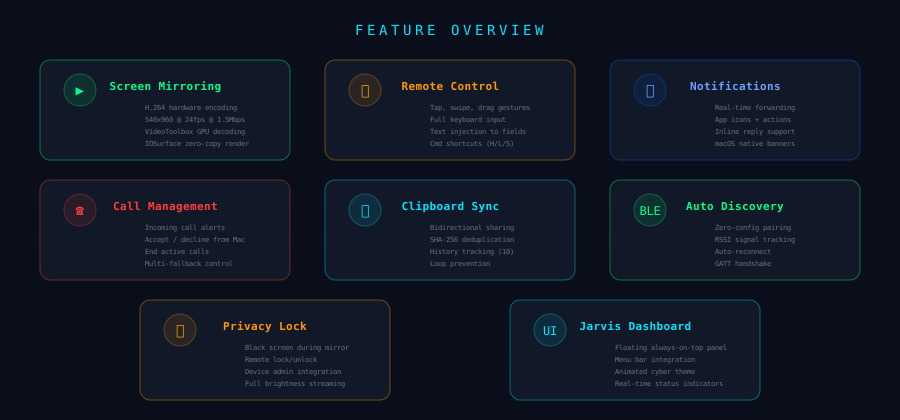
The core features:
- Screen mirroring at 24 FPS with hardware-accelerated H.264 encoding and decoding
- Full remote control — tap, swipe, type, and use keyboard shortcuts from your Mac
- Notification forwarding with app icons, action buttons, and inline reply (reply to WhatsApp from your Mac's dashboard)
- Call management — see incoming calls, answer or decline, end active calls
- Clipboard sync — copy on your phone, paste on your Mac, and vice versa
- Privacy lock — black out the phone screen while still streaming full-brightness video to your Mac
- Zero-config discovery — BLE handles device discovery, no IP addresses to type
Architecture: BLE for Discovery, TCP for Everything Else
The system is split into two communication channels with very different jobs.

Bluetooth Low Energy handles discovery and handshake. The Android device advertises a GATT service with a known UUID. The Mac scans for this UUID, connects, and reads a characteristic containing the phone's IP address and TCP port. This is the entire purpose of BLE in the system — after the handshake, all real data flows over TCP.
TCP carries everything else — video frames, notifications, input commands, call events, clipboard data — through a single multiplexed connection on port 9734. A custom binary frame protocol tags each payload with its type, so the receiver knows whether it's looking at an H.264 NAL unit or a JSON notification.
Why not just use BLE for everything? Bandwidth. BLE maxes out around 20KB/s in practice. A 540x960 H.264 stream at 1.5 Mbps needs roughly 187KB/s — nearly 10x what BLE can handle. TCP over WiFi gives us the bandwidth for video while BLE gives us the zero-config discovery experience.
The Video Pipeline
The video streaming pipeline is the most technically challenging part of the system. It spans two platforms, two codec APIs, and requires a format conversion that isn't documented anywhere obvious.
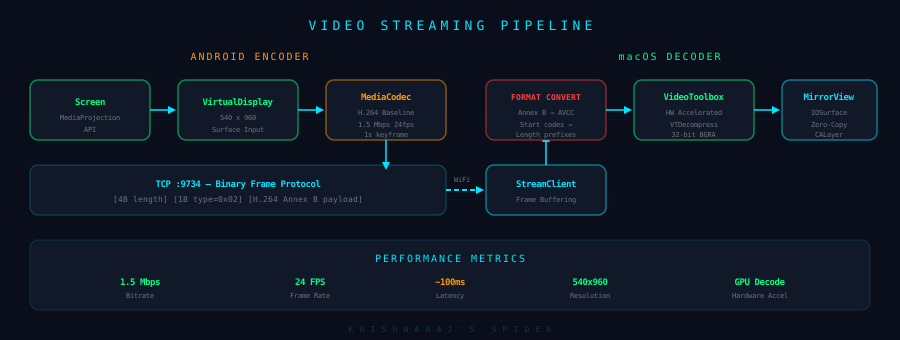
Android: Capture and Encode
On Android, MediaProjection provides access to the screen contents. It creates a VirtualDisplay that renders the screen at 540x960 (downscaled from the device's native resolution to keep bandwidth reasonable). This VirtualDisplay feeds directly into a MediaCodec encoder configured for H.264 Baseline profile.
The encoder settings matter more than you'd think:
// Bitrate: 1.5 Mbps balances quality and bandwidth
// Keyframe interval: 1 second means recovery from packet loss within 24 frames
// Baseline profile: maximum decoder compatibility
format.setInteger(MediaFormat.KEY_BIT_RATE, 1_500_000)
format.setInteger(MediaFormat.KEY_FRAME_RATE, 24)
format.setInteger(MediaFormat.KEY_I_FRAME_INTERVAL, 1)
format.setInteger(MediaFormat.KEY_PROFILE, MediaCodecInfo.CodecProfileLevel.AVCProfileBaseline)
As frames come out of the encoder, they're wrapped in our frame protocol (4-byte length prefix + 1-byte type tag) and written directly to the TCP socket. The first frame is always the codec configuration data (SPS and PPS parameter sets) — the decoder needs these before it can decode any video frames.
macOS: Decode and Render
The Mac side receives the TCP stream, reassembles frames from the binary protocol, and feeds them to Apple's VideoToolbox framework for hardware-accelerated H.264 decoding.
But there's a critical gotcha: Android's MediaCodec outputs H.264 in Annex B format (NAL units separated by 0x00000001 start codes), while VideoToolbox expects AVCC format (NAL units prefixed with their 4-byte big-endian length). Getting this wrong means the decoder silently fails — no error, no crash, just no video.
The conversion is straightforward once you know it's needed:
private func annexBToAVCC(_ data: Data) -> Data {
    // Split on start codes (0x00000001 or 0x000001)
    // Replace each start code with a 4-byte big-endian length prefix
    // That's it. But finding this out took hours.
}
Decoded frames come out as CVPixelBuffer objects backed by IOSurface, which means they can be rendered with zero memory copies — the GPU writes the decoded pixels, and the display layer reads them directly. No CPU involvement in the final blit.
Frame Dropping, Not Buffering
A key design decision: we never buffer frames. Each new decoded frame replaces the previous one. If the decoder falls behind, old frames are simply discarded. This keeps input latency low — when you tap on the mirror view, you want to see the response on the current frame, not on a frame that's queued 200ms behind reality.
The Binary Frame Protocol
All communication over TCP uses a simple binary protocol. Every frame has a 5-byte header followed by a variable-length payload.
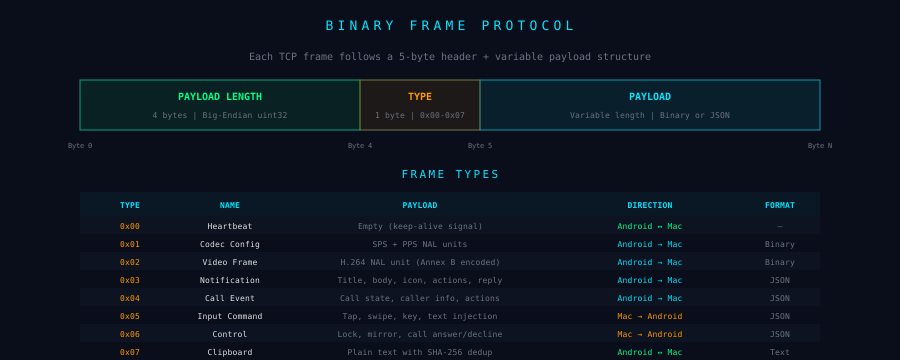
Eight frame types cover everything the system needs. Video and codec data are raw binary. Notifications, input commands, and control messages are JSON. Heartbeats are empty — just the 5-byte header with zero-length payload.
The heartbeat runs every 2 seconds. If the Mac doesn't receive a heartbeat within 8 seconds, it marks the phone as unreachable and shows a network warning in the dashboard. When the connection drops, the Mac automatically reconnects with exponential backoff (1s, 2s, 4s, 8s, capped at 10s).
BLE Discovery Flow
The discovery sequence is designed to be completely automatic. The user never types an IP address or scans a QR code.
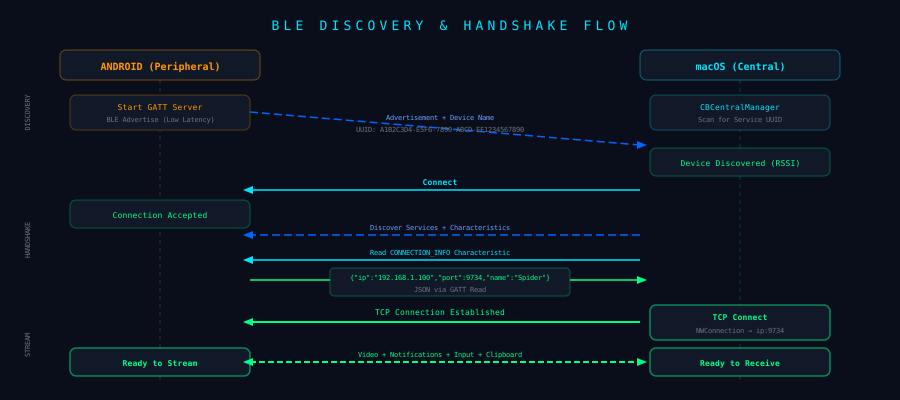
The Android device starts a BLE GATT server with three characteristics:
- Connection Info (read) — returns JSON with the device's WiFi IP, TCP port, and display name
- Clipboard (read/write) — for bidirectional clipboard sync over BLE
- Command (write) — for control commands before TCP is established
The Mac scans for the service UUID, discovers the device (with RSSI for signal strength), connects, reads the Connection Info characteristic, and immediately opens a TCP connection to the returned IP:port. The BLE link stays alive for disconnect detection — if the phone goes out of BLE range, the Mac knows the device is gone and cleans up.
The whole process from launch to "connected" takes about 2-3 seconds.
Notification Forwarding with Inline Reply
This was the feature that made Spider feel like a real iPhone Mirroring replacement. Android's NotificationListenerService gives us access to every notification posted on the device. For each notification, we extract:
- Title and body text
- App icon (resized to 48x48, Base64-encoded PNG)
- Action buttons (with their labels and whether they support text input)
- Conversation history (for messaging apps that use
MessagingStyle) - The originating package name (mapped to friendly names like "WhatsApp", "Gmail", etc.)
This gets serialized to JSON and sent over the TCP stream. On the Mac side, two things happen:
- A native macOS notification is posted with the app icon and action buttons, so it appears in Notification Center like any other notification
- The notification is tracked in the dashboard, where it appears as an expandable card with the app name, title, body preview, timestamp, and — if the notification supports reply — an inline text field
When you type a reply in the dashboard and hit send, Spider sends a control command back to Android with the notification key, action index, and reply text. Android looks up the original notification, finds the RemoteInput action, injects the reply text, and fires the PendingIntent. WhatsApp receives it as if you typed the reply on the phone.
The inline reply was the trickiest part — Android's RemoteInput API requires you to build an Intent with RemoteInput.addResultsToIntent(), which bundles the text into the original notification's reply action. Getting the action index and result key wrong means the reply silently disappears.
Input Injection
Remote control uses Android's AccessibilityService for gesture injection. The Mac captures mouse events and keyboard input, scales coordinates from the view size to the Android screen resolution (540x960), and sends input commands over TCP.
Tap: Single touch at scaled coordinates, dispatched as a 100ms gesture stroke
Swipe: Start and end coordinates with duration, dispatched as a path-based gesture stroke. Minimum 10px distance to avoid misdetection as a tap.
Keyboard: Mac keycodes mapped to Android keycodes. Escape becomes KEYCODE_BACK, Delete becomes KEYCODE_DEL, arrow keys map to DPAD codes. Command-key shortcuts provide quick access: Cmd+H for Home, Cmd+L for Lock, Cmd+S for Screenshot.
Text: For text fields, instead of sending individual keystrokes, Spider finds the focused EditText via AccessibilityNodeInfo.findFocus() and sets the entire text content with ACTION_SET_TEXT. This handles IME complexities and works regardless of keyboard language.
Clipboard Sync
Clipboard sync sounds simple but has a subtle infinite loop problem. When the Mac sends clipboard text to Android, Android's ClipboardManager fires an onPrimaryClipChanged event. If we naively send that back to the Mac, we're in a loop.
The solution: SHA-256 hash deduplication with dual tracking. Both sides maintain two hashes — lastSentHash (content we sent to the other device) and lastReceivedHash (content we received from the other device). Before sending, we check if the current clipboard hash matches either. If it does, we skip — we already know about this content.
Mac copies "hello" → SHA-256 → doesn't match either hash → send to Android
Android receives "hello" → sets lastReceivedHash → updates clipboard
Android detects clipboard change → SHA-256 → matches lastReceivedHash → skip
No loops. No extra network traffic. The polling interval on macOS is 300ms (NSPasteboard doesn't have change notifications, so we check changeCount on a timer).
The Jarvis Dashboard
The macOS app lives in the menu bar and opens a floating dashboard panel (NSPanel subclass, always-on-top, visible across all Spaces). The design uses a dark cyberpunk aesthetic inspired by Iron Man's JARVIS interface — cyan accents, monospace typography, animated scan lines, and glowing status indicators.
The dashboard is a single SwiftUI view backed by SpiderState, a centralized @MainActor ObservableObject that owns every component — BLE scanner, TCP client, H.264 decoder, notification bridge, clipboard sync. All wiring happens in SpiderState.setup(), which connects callbacks from the TCP client to the notification bridge, clipboard sync, and UI state.
Key UI elements:
- Device header with BLE and TCP status dots (green = connected, orange = scanning, grey = offline)
- Call card that appears for incoming/active calls with answer, decline, and end buttons
- Notification section with expandable cards, inline reply, and a clear-all button
- System status showing BLE RSSI and TCP endpoint
- Mirror button that triggers screen capture and opens the mirror window
What I Learned
Format conversions are the hardest bugs to find. The Annex B to AVCC conversion took longer to debug than the entire TCP networking stack. The decoder just silently produces no output — no error codes, no crashes, no logs. You have to know the format mismatch exists to even start looking.
Accessibility APIs are powerful but fragile. Android's AccessibilityService can inject any gesture, but the timing, duration, and coordinate scaling all have to be exactly right. A swipe that's 5ms too short becomes a tap. A coordinate that's 1px off might hit the wrong element.
BLE is great for discovery, terrible for data. Using BLE solely for the handshake and TCP for everything else was the right architectural split. Every attempt to push more data through BLE resulted in reliability issues, packet drops, and MTU negotiation headaches.
State management across two platforms is a coordination problem. The hardest bugs weren't in either platform individually — they were in the interaction between them. A notification reply that works perfectly in isolation fails when the notification has already been dismissed on Android. A clipboard sync that's correct in theory loops in practice because of timing.
Tech Stack
Android: Kotlin, Jetpack Compose, MediaProjection, MediaCodec, AccessibilityService, NotificationListenerService, InCallService, BLE GATT Server
macOS: Swift, SwiftUI, VideoToolbox, CoreBluetooth, Network.framework (NWConnection), UserNotifications, NSPanel, IOSurface
Protocol: Custom binary frame protocol over TCP, BLE GATT for discovery, JSON for structured data, H.264 Annex B for video
No dependencies. Zero third-party libraries on either platform. Everything is built on platform APIs.
Spider is open source. The Android and macOS apps are maintained in separate repositories and available as pre-built binaries on GitHub Releases.